Input Agent
Overview
The Input Agent in the Segma-Vision Agriculture project plays a crucial role in interpreting user queries and determining the tasks that need to be performed based on those inputs. The agent utilizes the Gemini LLM (Large Language Model) to analyze user input and decide which agricultural-related tasks are necessary, whether an image is required, and if additional information is needed.
Tasks handled by the Input Agent:
Plant disease detection/classification
Weed detection
Soil classification analysis
Agriculture crop yield prediction
Plant identification
How It Works
User Input: The user provides a query regarding an agricultural task.
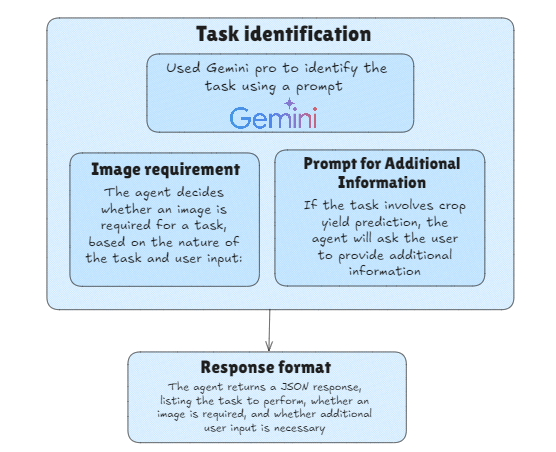
Gemini LLM Analysis: The input agent sends the query to the Gemini LLM, which analyzes the text and determines the necessary tasks.
Task Decision: Based on the user input, the agent decides which tasks should be executed and whether any additional information is required (e.g., crop details, city name).
JSON Response: The tasks and their requirements (image or additional info) are returned in a structured JSON format.
The Input Agent’s role is to ensure that the right tasks are triggered and to prompt the user for additional information when necessary.
Task Decision Flow Diagram
The following diagram shows how the Input Agent processes the user input, analyzes it using Gemini LLM, and determines the appropriate tasks. It also indicates whether additional information or images are required for the tasks.
Task Decision Code
The following Python code defines how the Input Agent decides which tasks to perform based on the user’s query:
import google.generativeai as genai

# Configure the Gemini API key
genai.configure(api_key="YOUR_API_KEY")

def decide_tasks(user_input):
    """
    Use Gemini LLM to decide which tasks to perform based on user input.
    Returns a JSON list of tasks and whether an image is required.
    """
    prompt = f"""
    You are an intelligent assistant that determines which tasks to perform based on user input.
    The tasks you can perform are:

    1. Plant disease detection/classification (requires an image of the plant).
    2. Weed detection (requires an image of the field or plant).
    3. Soil classification analysis (requires either an image of the soil or soil data).
    4. Agriculture crop yield prediction (requires non-image data like historical or environmental data).
    5. Plant identification (requires an image of the plant).

    Instructions:
    - Analyze the user's query carefully.
    - Identify which task(s) from the list above should be performed.
    - Specify whether an image is required for each task.
    - If the task is "Agriculture crop yield prediction", prompt for additional information like the city, days, and crop name.
    - Respond strictly in JSON format as follows:
    [
        {{"task": "Task Name", "image_required": true/false, "additional_info_required": true/false}},
        ...
    ]
    """

    # Send the prompt to Gemini
    model = genai.GenerativeModel('gemini-pro')
    response = model.generate_content(prompt)

    # Parse response to handle user input
    response_text = response.text.strip()

    # Print and return the response
    print(response_text)
    return response_text
Task Examples
The following examples illustrate how the Input Agent handles user queries and decides on the appropriate tasks:
- User Input: “Analyze this plant for diseases.”
Output:
[
    {"task": "Plant disease detection and classification", "image_required": true, "additional_info_required": false}
]
- User Input: “Predict crop yield for my farm.”
Output:
[
    {"task": "Agriculture crop yield prediction", "image_required": false, "additional_info_required": true}
]
- User Input: “Identify this plant and check for weeds.”
Output:
[
    {"task": "Plant identification", "image_required": true, "additional_info_required": false},
    {"task": "Weed detection", "image_required": true, "additional_info_required": false}
]
- User Input: “Analyze the soil and predict the yield.”
Output:
[
    {"task": "Soil classification analysis", "image_required": true, "additional_info_required": false},
    {"task": "Agriculture crop yield prediction", "image_required": false, "additional_info_required": true}
]
Code for Input Agent
The Input Agent uses the Gemini LLM model to determine the appropriate tasks to perform based on the user’s input. Below is the Python code for the Input Agent:
import google.generativeai as genai

# Configure the Gemini API key
genai.configure(api_key="AIzaSyABEGpz2mVOYKhtR25cjknlpNaHHJ_6Hzs")

def decide_tasks(user_input):
    """
    Use Gemini LLM to decide which tasks to perform based on user input.
    Returns a JSON list of tasks and whether an image is required.
    """
    prompt = f"""
    You are an intelligent assistant that determines which tasks to perform based on user input.
    The tasks you can perform are:

    1. Plant disease detection/classification (requires an image of the plant).
    2. Weed detection (requires an image of the field or plant).
    3. Soil classification analysis (requires either an image of the soil or soil data).
    4. Agriculture crop yield prediction (requires non-image data like historical or environmental data).
    5. Plant identification (requires an image of the plant).

    Instructions:
    - Analyze the user's query carefully.
    - Identify which task(s) from the list above should be performed.
    - Specify whether an image is required for each task.
    - If the task is "Agriculture crop yield prediction", prompt for additional information like the city, days, and crop name.
    - Respond strictly in JSON format as follows:
    [
        {{"task": "Task Name", "image_required": true/false, "additional_info_required": true/false}}
    ]

    Examples:

    User input: "Analyze this plant for diseases."
    Output:
    [
        {{"task": "Plant disease detection and classification", "image_required": true, "additional_info_required": false}}
    ]

    User input: "Predict crop yield for my farm."
    Output:
    [
        {{"task": "Agriculture crop yield prediction", "image_required": false, "additional_info_required": true}}
    ]

    User input: "Identify this plant and check for weeds."
    Output:
    [
        {{"task": "Plant identification", "image_required": true, "additional_info_required": false}},
        {{"task": "Weed detection", "image_required": true, "additional_info_required": false}}
    ]

    User input: "{user_input}"
    """

    # Send the prompt to Gemini
    model = genai.GenerativeModel('gemini-pro')
    response = model.generate_content(prompt)

    # Parse response to handle user input
    response_text = response.text.strip()

    # Handling additional info requirement for crop yield prediction task
    if "Agriculture crop yield prediction" in response_text:
        additional_info_required = True
    else:
        additional_info_required = False

    # Print and return the response
    print(response_text)
    return response_text


def get_additional_info_for_crop_yield_prediction():
    """
    Prompts user for additional information required for crop yield prediction.
    """
    city_name = input("Enter city name: ")
    days = input("Enter number of days to analyze (default 30): ").strip()
    days = int(days) if days.isdigit() else 30
    crop_name = input("Enter crop name: ")

    return city_name, days, crop_name
This code snippet demonstrates how the Input Agent works. When the user provides a query, the agent uses the Gemini LLM to determine the task that needs to be performed and whether any additional information or image is required. The agent responds in a JSON format that is easy to parse and use for further processing.